Uncollated vs Collate Meaning: Core Difference
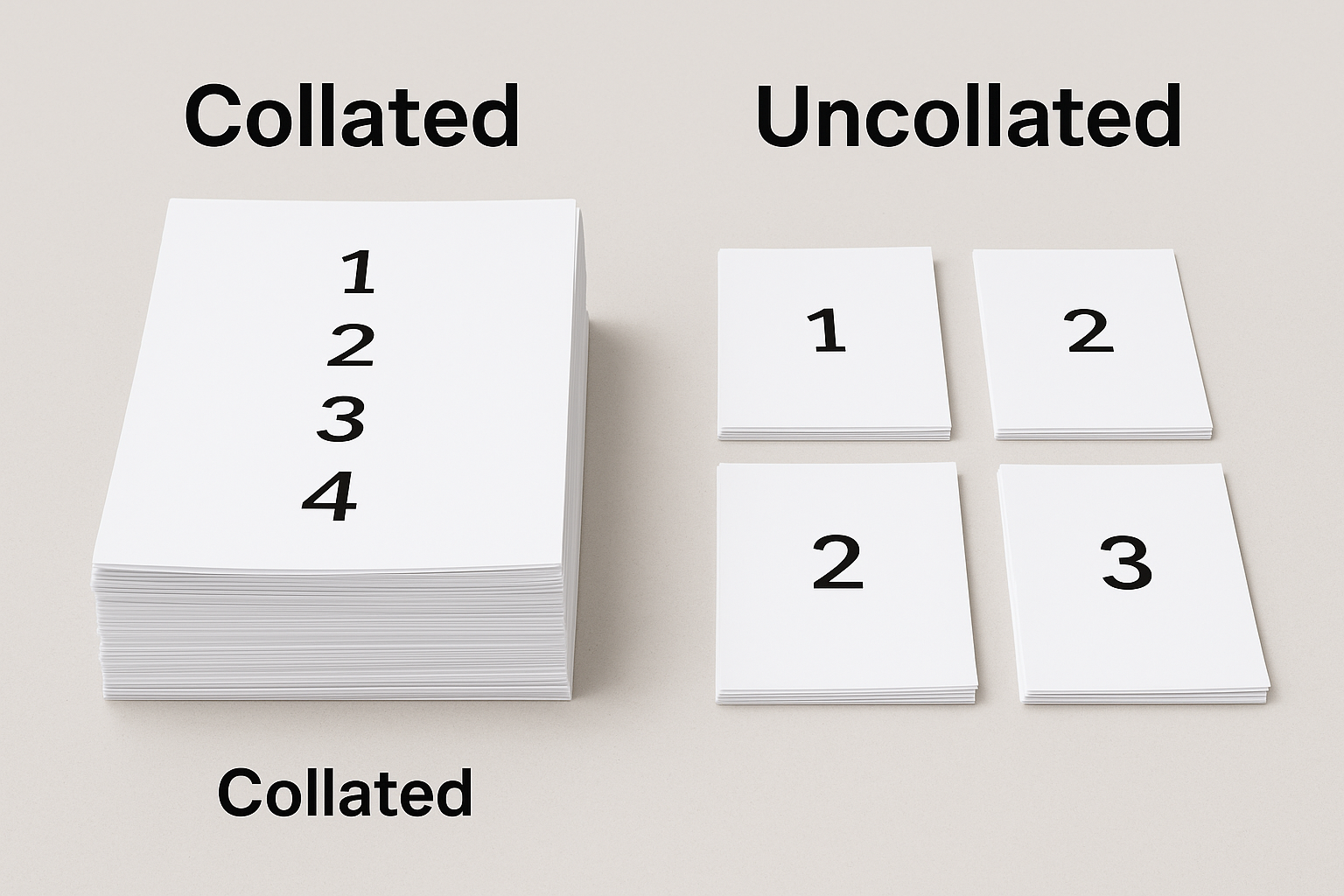
A printer’s collate setting outputs complete document sets in sequence, whereas uncollated output stacks each page in separate piles. Both collated and uncollated modes cost the same per copy but serve different workflow goals. Choose collate for multi-page packets; choose uncollated for single-sheet handouts. This summary highlights that “collated printing” refers to pages arranged in order, while “uncollated” means grouped by page without regard to sequence.
Collated Meaning for Print Professionals
A collated document (theme) is created (action) by organizing sequential pages (attribute) into ordered sets (result). In printing and database contexts, collated literally means “gathered in proper order,” rooted in Latin colligare (“to bind together”). When a print shop agent arranges the pages, the collating function (agent) ensures each copy (theme) emerges as a complete packet (result). Typical projects include booklets, manuals, research reports, and training decks—cases where page order matters for binding, packaging, and reader navigation.
For example, when Triboro Printing (agent) produces a 100-page company manual (theme), the offset printing equipment (instrument) collates (action) pages 1 through 100 into 50 consecutive sets (result). Collation saves post-press labor because binding machines can align and staple without interruption.
Pro Tip: High-volume digital presses often collate and staple in one pass, reducing post-press labor.
What Does Uncollated Mean in Printing?
An uncollated print job (theme) is produced (action) without sequence, resulting in stacks of page 1, page 2, page 3, and so forth. This mode accelerates (action) press cycles (result) because the printer (agent) processes each page number consecutively rather than each set. Use cases include flyers, coupons, lab worksheets, and event tickets—situations where recipients do not need ordered packets.
For instance, a marketing department may request 1,000 flyers with varying designs; Triboro Printing (agent) can print uncollated stacks (result) to streamline hand-insertion into mailing envelopes. Uncollated runs speed up variable-data campaigns (theme) because each page’s data can be batched by design rather than by recipient. Quality control (QC) for individual sheets (theme) is simpler when pages are separated (action) since checking a single page for color accuracy requires flipping through fewer stacks.
Uncollated vs Collated Printing in the Real World
Below is a comparison table illustrating differences between uncollated and collated print jobs. This table contains “Purpose,” “Output Order,” “Ideal Job Type,” and “Typical Finishing.” It helps readers understand why collated documents (entity) and uncollated bundles (entity) align with different operational needs (context). By visualizing scenarios, businesses can link the “difference between collated and uncollated sets” to real-world examples.
|
Purpose |
Output Order |
Ideal Job Type |
Typical Finishing |
|
Assemble multi-page manuals |
Complete sets: 1–N, 1–N, 1–N |
15-page employee handbook, training manuals |
Binding, stapling, saddle stitching |
|
Distribute single-sheet handouts |
Stacks by page number: all page 1, page 2, etc. |
500 color flyers per design, coupons, posters |
Bulk mailing, no binding |
|
Insert last-minute materials into packets |
Start collated, switch to uncollated for updated pages |
8-page conference packets with variable inserts |
Partial stapling, manual insertion, tab placement |
In scenario 1, a 15-page employee handbook (theme) requires collated printing (action) to ensure correct page sequence (result). In scenario 2, 500 color flyers per design (theme) are more efficient printed uncollated (action) because sorting by design rather than by booklet reduces press changeover time (result). In scenario 3, an 8-page conference packet (theme) may start as collated (action) for basic assembly, then switch to uncollated (action) to insert last-minute handouts (result), preventing mis-ordering during manual replacement.
How to Select Collate on Any Printer
Selecting collate on any printer involves specifying the “collating option” in your print driver (agent) so that the printer (agent) arranges pages (theme) into sequential sets (result). Below are step-by-step instructions for Windows, macOS, and copier touchscreens. A short sub-section on cloud print drivers follows.
- Windows (Print Dialog Method):
- Open your document in the desired application (agent: user).
- Press Ctrl+P or select File → Print (action).
- In the print dialog box, click Printer Properties or Preferences (action).
- Navigate to the Finishing or Layout tab (theme).
- Check the box labeled Collate or Collate – Collation (result).
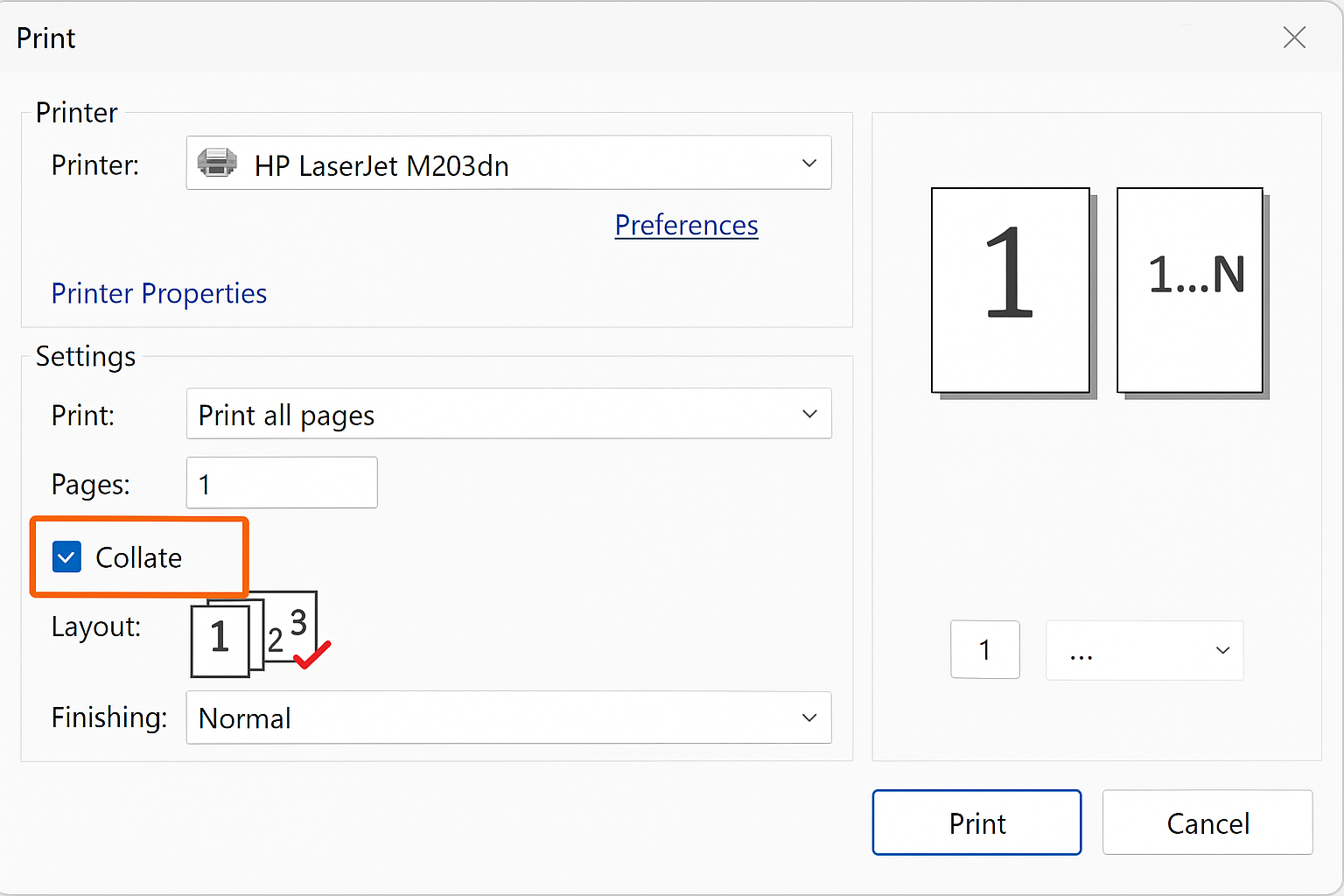
- Preview the print order in the sidebar (agent: driver) to confirm pages 1–N appear in each set (result).
- Click Print to produce collated sets (action).
- macOS (Print Dialog Method):
- With your file open, select File → Print (agent: user).
- In the print dialog, click Show Details to expand options (action).
- Locate the Copies & Pages dropdown and choose Layout (theme).
- Check the Collate checkbox (result).
- Confirm the preview shows complete sets (agent: system).
- Choose Print to begin the job (action).
- Copier Touchscreens (Office Multifuntion Devices):
- Access the printer’s touchscreen control panel (action).
- Select Copy/Print Settings (agent: user).
- Under Output or Finish menu, find Collate (theme).
- Toggle Collate On (result).
- Load paper and press Start (action).
- Caution: Some copiers default to uncollated after each job. Always verify the collate toggle before large, unattended runs.
- Cloud Print Drivers (e.g., Google Cloud Print, AirPrint):
- When connected via a cloud driver, open your document and select Print (agent: user).
- If the cloud service supports advanced settings, click More Settings (action).
- Enable Collate under Copies & Pages (result).
- Because cloud drivers vary, consult Triboro Printing’s customer portal (agent) or your print admin (agent) for specifics on non-native drivers.
These steps avoid confusion about “collating options in print settings” and ensure consistent “collation options” across diverse operating systems (theme). Remember that some enterprise drivers hide collate under “Finishing,” “Job Setup,” or “Output” menus.
Manual Collation for Small Batches

When a small run (under 20 sets) requires custom inserts—such as mixed-media packets or specialty tabs—manual collation remains efficient. First, print all pages in uncollated mode (action) so that you obtain separate stacks of page 1, page 2, and so forth. Then, lay out the stacks on a flat surface (agent: operator) in sequential order: stack page 1 on top of stack page 2, continue through page N. Assemble each set by pulling one sheet from each stack left to right. For example, in a 10-page micro report, the operator picks a sheet from the “page 1” pile, then “page 2,” and so on until the “page 10” pile, forming one complete report.
Next, bind or staple the assembled sets. Use inexpensive aids—collation trays (agent: tool), color-coded slip sheets, or joggers (agent: tool)—to streamline alignment. Position the slip sheets between complete sets to prevent sheets from merging. An operator should work methodically and check that each set matches the source PDF’s page count (agent: QC). This ergonomically sound workflow (result) reduces mis-ordering errors and maintains quality when digital collate functions are impractical or unavailable.
Productivity, Cost, and Waste Considerations
Choosing between collated and uncollated printing influences productivity, cost, and material waste. Collated printing reduces post-press labor (theme) because the printer (agent) arranges pages into ordered sets (action), ready for binding or stapling (result). However, collate may slow press cycles (result) for very large jobs because the print engine must pause to sort each set. Uncollated printing, by contrast, processes page 1 dozens or hundreds of times consecutively (action), speeding up print output (result) but shifting labor to human operators who stack and assemble sets manually.
- Collation Reduces Waste: Because pages are sorted by sets, a misfeed or paper jam typically affects one set (theme), not the entire page N stack. This precision leads to fewer spoiled sheets (result), reducing material waste.
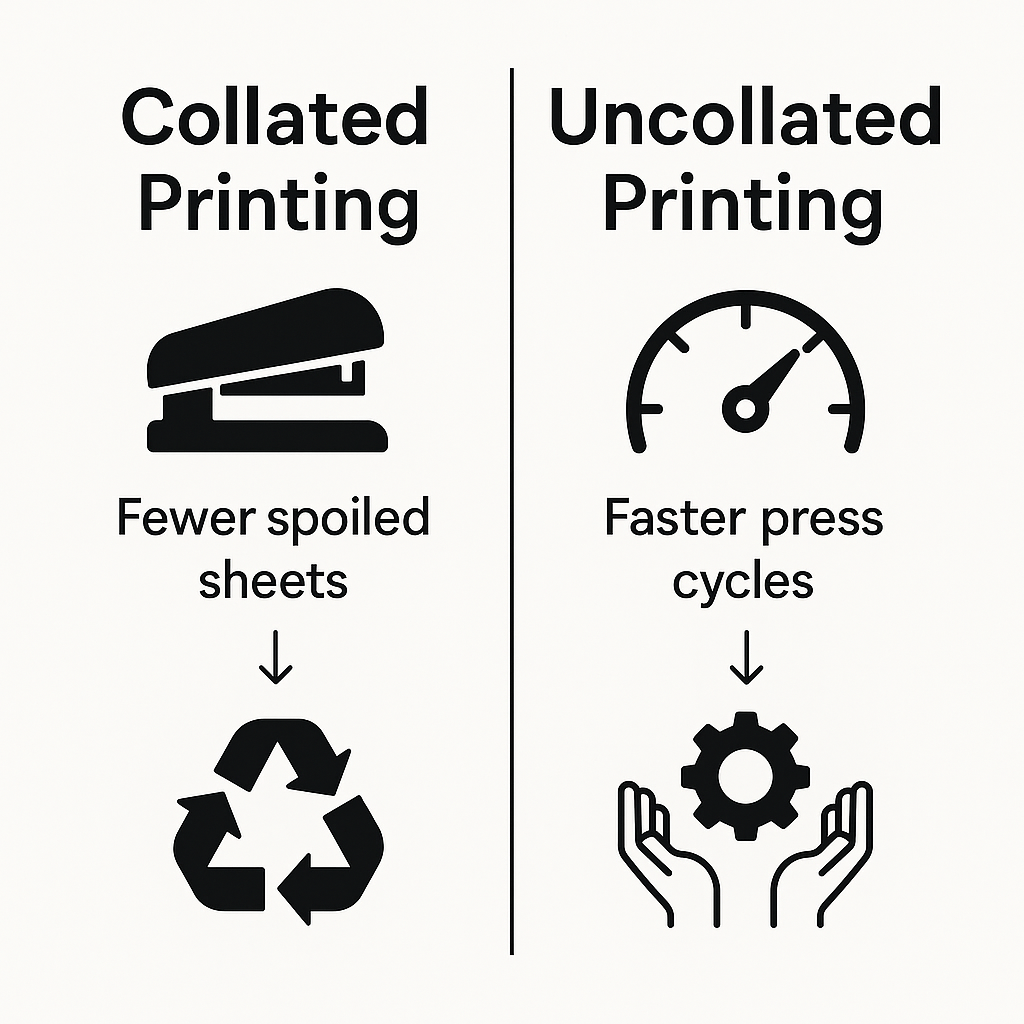
- Uncollated Saves Press Time: By bundling all copies of page X before moving to page X+1, the printer (agent) minimizes mechanical stops (action). This efficiency is ideal for single-sheet campaigns (theme), like newsletters or coupons, where manual sorting is acceptable.
- Digital Press Optimization: Advanced digital presses use “smart collation” algorithms (agent) to minimize redundant prints. For example, a variable-data campaign (theme) can merge collated output with web-to-print workflows (result), narrowing wasted clicks (action).
Triboro Printing’s production specialists recommend collated printing (action) when binding accuracy is paramount, such as in training decks or sales catalogs, and uncollated runs (action) for high-volume flyer drops where manual sorting is built into the mailing process.
FAQs: Collate vs Uncollated at a Glance
Below are six concise questions and answers, each under 40 words, to address common search queries related to “collate vs uncollated printing.” Each answer uses “LRB” (left bracket) and “RRB” (right bracket) to indicate entity structure where relevant.
- Does collating cost more?
Collating does not increase per-copy cost; the printer (agent) only rearranges page order (action). Both collated and uncollated print jobs share the same page rate (result). - Will my printer staple automatically if I choose collate?
Collate alone does not staple (action). To staple, select “Collate” and enable “Staple” under finishing options. The printer (agent) then binds sets (result). - Can I mix color and black-white pages when collated?
Yes. When collating, the print driver (agent) interleaves color and black-white files (action) into each set (result), provided the print job’s PDF layers are formatted properly. - Why does my office copier default to uncollated?
Many copiers reset collate (action) to default uncollated after each job, to prevent unintended assembly (result). Always verify the collate checkbox before printing long runs. - How do I collate PDFs before sending to a print shop?
In PDF software, choose “Print to PDF” (agent: user), check “Collate” under Copies or Layout (action), then save the collated PDF as a new file (result) for the print shop. - Does duplex printing affect collation?
Duplex printing flips pages automatically (action) but does not disable collation. The printer (agent) still orders front and back pages sequentially (result), so verify your print driver’s “Duplex + Collate” box.
Trouble-shoot Guide for Collate Errors
Common collate errors often stem from printer memory limitations or outdated driver configurations (theme). The checklist below helps diagnose and resolve issues efficiently:
- Verify Page Count in Driver: Ensure the print driver (agent) recognizes the correct number of pages (action). Mismatched page count can cause mis-ordering (result).
- Clear Pending Print Jobs: Open the print queue (agent: user) and delete stalled jobs (action) to free memory. Residual jobs may mix collated and uncollated commands (result).
- Update Printer Firmware and Drivers: Download the latest firmware (agent) from the manufacturer’s website (action). Newer drivers often fix collation bugs (result), especially on copiers and cloud drivers.
- Break Large Files into Smaller Blocks: If a 500-page file exceeds buffer capacity (agent), split into 100-page segments (action). Print each segment separately (result) to avoid memory overruns.
- Check Collate Checkbox in Application: Some applications (e.g., Adobe Acrobat, Microsoft Word) default to uncollated (action). Always confirm the “Collate” setting before printing large jobs (result).
- Test with a Simple PDF: Create a short, collated PDF with sample pages (action) to verify the printer’s collation function (result). If simple tests work, but larger files fail, focus on file-specific issues.
Most troubleshooting leads to updating drivers or splitting files, as oversized print buffers (theme) and outdated drivers (theme) often cause page order errors. Triboro Printing’s technical support team can also remotely verify driver settings to resolve persistent collation errors.
How to Choose the Right Mode for Your Next Job
When determining print mode, follow this decision flowchart:
- Is your file more than two pages?
- No: Choose uncollated. Single-sheet handouts and flyers benefit from “what is uncollated paper” since manual assembly is minimal.
- Yes: Proceed to question 2.
- Will recipients need pages assembled in order?
- No: Uncollated saves press time on bulk sheet runs, such as variable-data marketing campaigns.
- Yes: Proceed to question 3.
- Do you plan to bind or staple?
- No: If you only need page numbers for reference, uncollated can work, but consider collated if assembly occurs offsite.
- Yes: Collate ensures each set is ready for binding, saddle stitching, or perfect binding.
By mastering collate vs uncollated choices, a business (agent) saves time, money, and headaches. Ultimately, Triboro Printing’s experts can walk you through custom recommendations—whether you need “best print option for manuals” or high-volume, non-sequential flyer runs. Contact us to ensure your next project leverages the optimal collation mode and delivers professional results.
Triboro Printing produces our NYC business printing services in house, with proofs before anything goes to press.